SALTLINE WIKI / PLAYER GUIDE
Saltline controls
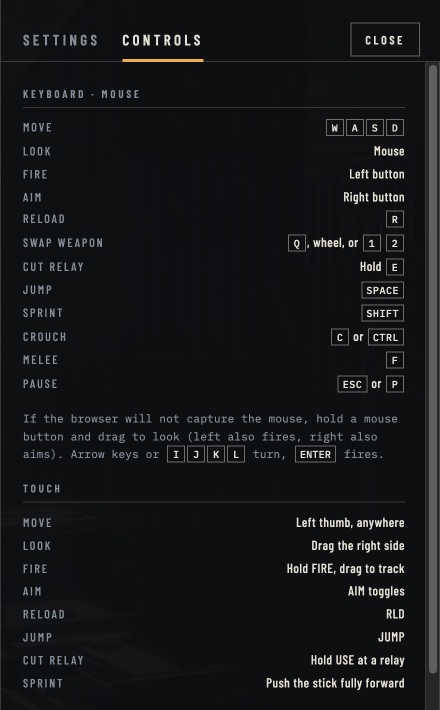
These bindings are transcribed from the revised original game’s Controls panel, checked on 12 November 2026. Open Controls in the game if its interface has changed. A listed binding is not a claim that we tested every device.
Source check · 12 Nov 2026 · Current revised artifact
Keyboard & mouse
| Action | Input |
|---|---|
| Move | W · A · S · D |
| Look | Mouse |
| Fire | Left mouse button |
| Aim | Right mouse button |
| Reload | R |
| Swap weapon | Q, mouse wheel, or 1 / 2 |
| Cut relay | Hold E at a relay |
| Jump | Space |
| Sprint | Shift |
| Crouch | C or Ctrl |
| Melee | F |
| Pause | Esc or P |
If the mouse will not lock
The current Controls panel provides alternatives: hold a mouse button and drag to look; the left button also fires and the right button also aims. Arrow keys or IJKL turn, and Enter fires. Our desktop session displayed an additional fallback message about moving the mouse and resting it at a screen edge to keep turning. Check which message your session shows.
Mobile & touch controls
Touch support is described in the game, but phone performance and input behavior remain device-dependent. Start by checking whether the original loads and whether its on-screen controls respond. The table documents the interface; it is not a physical-phone test.
| Action | Input |
|---|---|
| Move | Left thumb, anywhere; push fully forward to sprint |
| Look | Drag the right side |
| Fire | Hold FIRE; drag to track |
| Aim | AIM toggles aiming |
| Reload | RLD |
| Jump | JUMP |
| Cut relay | Hold USE at a relay |
Controller bindings listed by the game
Move with the left stick and look with the right. RT fires, LT aims, X reloads, and holding X at a relay cuts it. Y or the D-pad swaps weapons; A jumps; B or LB crouches. Click the left stick to sprint; RB or a right-stick click uses melee; Start pauses. These labels follow the game’s layout, and we have not connected a controller to verify hardware mapping.
The game notes that browsers start sound only after a click or key press. If a controller-only start is silent, click once in the game. This is separate from checking system volume or a muted browser tab.
Sources & creator credit
Gameplay facts here refer to the revised artifact linked above. Creator statements and player reports are identified separately.